|
|
Registry :
The Windows Registry is a database where all the information about your computer is stored. Everything from user preferences, installed
applications, or changes you make in Control Panel, are included in the Registry database. The Registry is edited with a tool found in your Windows folder. That tool is the
Registry Editor. It's called Regedit.exe and is included with Windows for the purpose of viewing and editing the Registry. The Registry consists of 5 "hives", although it is not sorted as such by the editor. These hives are called DEFAULT (Windows default settings), SAM (passwords/logins), SYSTEM (device/hardware settings), SOFTWARE (3rd party app settings), and SECURITY (security settings). These are stored in the system32/config folder, with the originals stored in the windows/repair folder. Replacing corrupted hives with these original copies will take the computer back to its original Windows installation, a last resort for an unrepairable machine.
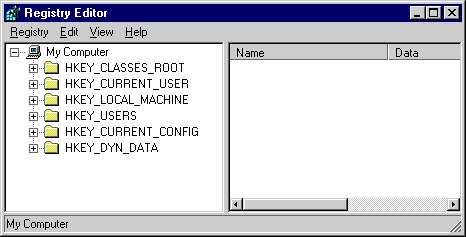
It is possible to break Windows by changing the Registry. Any changes you make should be done with caution. If you take the simple step of making a backup copy of the
Registry, you eliminate the possibility of disaster, although in cases where Windows will not load due to a corrupt registry, you will need to do it from a PE (Pre-Windows Environment) bootable disc. Definitely learn more about this before changing any of this information.
In the event windows becomes corrupted by a software installation or virus, the registry can be "rolled back" prior to the corruption. This is an added feature in ME, XP, Vista and 7 called "System Restore" located in START/PROGRAMS/ACCESSORIES/SYSTEM TOOLS,
but it can also be done in 98 and 98SE by restarting in MS-DOS mode and at the "C:\WINDOWS" prompt type SCANREG/RESTORE. In later versions of Windows, it can be done from a PE disc or through the so-called "Recovery Console". System Restore points are stored in c:\system volume information in an RP folder. There you can pick a saved registry dated prior to the
time you started having problems. This should be your FIRST effort to restore your system since Windows only saves so many backups and by continually rebooting eventually all
these saved registries will be corrupted versions. As mentioned, your LAST effort would be to replace the corrupted hives with the originals located in the Windows/repair folder. Click HERE for ME and Gateway instructions.
Unfortunately, the Registry can become bloated and corrupted if left not cleaned out once in awhile. This includes the deletion of leftover Registry entries (or
“orphans”) that should have been deleted by an application's uninstall procedure, and also trimming expired entries that accumulate over time. This
free program deletes these entries :
• FREE REGISTRY REPAIR
• NEXT
|
|